SuperTuxKart on Android: safe install, graphics settings, multiplayer
SuperTuxKart brings classic arcade kart racing to Android with character picks, drifting, boosts and items, plus graphics settings and multiplayer tips.
App summary
- App
- SuperTuxKart
- Developer
- supertuxkart (itch.io author); SuperTuxKart Team (per review)
- License
- GPL-3.0 (code); CC-BY-4.0 (assets)
- Version
- 1.5
- Size
- 175 MB
- Price
- Name your own price
SuperTuxKart is a free, open-source arcade kart racer, and the Android build packs version 1.5 into a 175 MB download. It is made by the SuperTuxKart Team and distributed on itch.io under GPL-3.0 code and CC-BY-4.0 assets. It suits players who want Mario Kart-style racing without ads or purchases, and who accept touch controls and phone hardware as trade-offs.
How the game actually plays
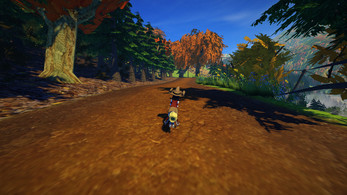
SuperTuxKart is a kart racer in the classic arcade mold. You pick a character, drop onto a track, and fight for position using speed boosts, drifting lines and the items scattered around each course. The handling is deliberately loose and forgiving, so races read as chaotic rather than technical.
The content list is unusually wide for a free game: official tracks, a roster of characters, and several game modes. Story Mode gives single-player a spine, egg hunts turn tracks into scavenger runs, and time trials push you to learn clean lines alone. Hundreds of community addons extend the roster further.
Everything on the track is built around momentum. Cutting corners too tight costs speed, drifting through them builds it back, and item timing decides close finishes. On a small screen that rhythm still works, but the margin for precise inputs shrinks, which shapes how the Android version plays.
Controls on a phone
The Android build uses touch controls: steering and action buttons layered over the 3D view. There is no tactile feedback, so you watch your thumbs instead of feeling them, and the overlay eats part of the screen. On a mid-range phone held in landscape, your grip covers the corners.
Precision suffers most. Drifting needs a deliberate timing input, and item use needs a fast tap while you are still steering. With keys or a gamepad those become muscle memory; on glass they stay conscious decisions. Expect your first races to feel clumsy rather than impossible.
Controller support is not described in the store listing, and the project publishes no device compatibility notes, so treat external gamepads as something to verify yourself. Screen and display size also matter, since a review of the game noted it did not scale well on a Samsung 4K TV.

Progression and the learning curve
Progression comes from clearing challenges rather than grinding currency. Story Mode sequences races and modes into a campaign, and each cleared node opens more of the roster and track list. Nothing sits behind payment; the only cost is time and skill.
The learning curve is mostly drift timing and track memory. Races feel random at first because you have not learned where items sit or which corners reward a slide. After a few laps on the same circuit, that chaos resolves into readable lines.
On Android the curve stretches slightly. Touch input makes the same manoeuvres harder to repeat, and frame rate dips blur your sense of speed. Expect to be slower on a phone than on a desktop for the same track, especially in time trials.
What you do in a session
A typical session is short and self-contained. You launch, pick a mode, and race two to five events, then quit. Story Mode gives those events a sequence; a quick local race gives them a finish line. No login, daily reward or stamina gate interrupts the flow.
The best first hour is about setup and calibration, not winning. Get the graphics stable, learn the touch layout, and clear a couple of Story Mode nodes so the structure of the game becomes visible.
- Install from the official itch.io page and confirm the file is version 1.5 at 175 MB.
- Launch once and lower visual quality until a busy race holds a steady frame rate.
- Run a single-lap time trial alone on one track to learn steering, drift and item buttons.
- Clear the first Story Mode challenges so characters and tracks unlock in order.
- Race a short event with opponents to see how the game feels in traffic.
- Only after that, check whether online play works and whether an addon is worth installing.
That order matters because the Android build rewards patience with settings first. Racing before you tune graphics means judging the game on a stuttering first impression, and the black-screen reports attached to older versions make a clean install worth confirming early.
Performance and size on Android
The Android download is 175 MB, the smallest package the project ships; desktop builds run from 689 MB to 879 MB and the Gift Package is 392 MB. The gap is most likely asset compression for mobile rather than missing content, though the listing does not break it down.
No minimum Android version or hardware baseline is published, and per-device FPS data does not exist here. Compatibility is therefore something you establish by trying it. Start at the lowest quality level, confirm a steady frame rate in a crowded race, then raise detail one step at a time.
Whatever quality toggles the build exposes, the rule stays the same: resolution and effects down first, frame rate up. A mid-range phone will not hold a high setting through eight karts and particle-heavy items, and a stable low setting plays better than an unstable high one.
| Aspect | Android 1.5 APK | Desktop 1.5 (Windows, macOS, Linux) | Gift Package |
|---|---|---|---|
| Download size | 175 MB | 689–879 MB depending on build | 392 MB |
| Price | Free (name your own price) | Free (name your own price) | $5 USD or more |
| Offline play | Story Mode, egg hunts, time trials, local races | Same modes, plus eight-player local on one machine | Same as desktop packages |
| Controls | Touch overlay on the screen | Keyboard or gamepad | Keyboard or gamepad |
| Progression | Shared unlock path, slowed by touch input | Shared unlock path | Early access to two extra tracks; other contents unstated |
Known complaints belong in this section too. A review criticised the interface and overall user experience, and some users report black screens and bugs, mostly on older versions. The 4K TV scaling note points at a UI that does not adapt well to unusual display sizes.
Installing it safely without the Play Store
The project’s platform list covers Windows, macOS, Linux, Android and Switch Homebrew, and no Play Store listing appears among them. That means installing from the itch.io page as an APK, which is normal for open-source Android games but shifts verification onto you.
The safety basics are mechanical. Download only from the official page, confirm the file name and version match the listing, and check the size against the published 175 MB. Scan the APK before installing, and keep installation from unknown sources as a temporary setting rather than a permanent one.
The licence helps in a way closed apps cannot match. GPL-3.0 code can be inspected by anyone, and the CC-BY-4.0 assets are openly licensed. That is not a warranty of safety, but it is a public record a repackaged APK from a forum does not carry. If that model appeals to you, Mindustry is another open-source Android game built the same way.
Privacy details are not published anywhere in the listing. No account is described, but what the game transmits when you go online is undocumented. If that matters to you, treat online play as opting in and keep offline modes as your default.
Multiplayer, offline play and addons
The player count runs from one to eight, with both local and server-based networked multiplayer. On desktop, eight friends can share one machine. On a phone the same number is listed, but one touchscreen cannot realistically host eight people, so local play on Android is a different proposition.
Offline play is the reliable part. Story Mode, egg hunts and time trials all run without a connection, so airplane mode costs you nothing except online races. That makes the Android build a decent commute game, provided the battery holds through a few races.
Online is the open question. The project posted a devlog titled “SuperTuxKart Online has gone dark”, and the current server status is not stated anywhere in the listing. Addons are the other community pillar, with hundreds available that add characters, tracks and modes after installation.
Addons deserve caution on a phone. Content installed from the community is not vetted the way official assets are, and heavy tracks cost frame rate on mid-range hardware. Install one at a time, test it on your device, and remove anything that makes races stutter.
Strengths and weaknesses
The strengths stack up quickly. It is open source, free to download, and playable on five platform families with shared content. Local multiplayer and online racing are present, the mode list is deep, and community addons keep the track list growing years after release. The project still ships updates long after launch, and 1.5 remains the current build.
Weaknesses are just as concrete. Reviews have criticised the interface and the wider user experience, which matters more on a touchscreen than on a desktop. Some users report black screens and bugs, usually tied to older versions. The 4K scaling complaint suggests a UI that resizes reluctantly.
The Android-specific gap is information. Minimum requirements, privacy details and online server status are all unpublished, so you cannot check compatibility before installing. Add the imprecision of touch controls and you get a game that is free to try and mildly annoying to troubleshoot.
Who should play it
Play it if you want a kart racer with no shop, no energy timer and no ad breaks, and if you are comfortable installing an APK from a project page. It also suits anyone who likes open-source software and wants to see what a fully free racer looks like. More picks in that spirit sit in the games section.
Play it if you have patience for tuning graphics and a screen big enough for the touch overlay. Skip it if you need a polished touch interface, guaranteed online matchmaking, or a store-scanned install. Skip it too if you expect Mario Kart levels of visual finish.
It gets compared to Mario Kart, and one review says it recalls Tux Racer. Those comparisons set expectations correctly: arcade racing, cartoon presentation, and rough edges rather than a premium product.
Verdict
SuperTuxKart on Android is a real game, not a demo port. The full mode list, the addon ecosystem and the open licence all survive the move to a phone, and 175 MB is the cheapest way to get the whole thing onto your device. What does not survive cleanly is precision.
The recommendation is conditional. Install it, tune the graphics, learn the touch layout, and keep offline modes as your core. Treat online play as unverified until the server situation is documented, and treat community addons as experiments rather than essentials.
If that sounds acceptable for a free download, the official page is where you start: SuperTuxKart on itch.io. Grab version 1.5, confirm the file size, and give the first hour to settings and a single time trial before you judge it. If you would rather browse before installing, the free Android games list is a better starting point.
Pros
- Open source
- Many game modes and playable characters; add-ons supported
- Local multiplayer up to 8 and online play; available on multiple platforms
Cons
- UI and UX criticized in a review
- Some user reports of black screen/bugs, especially older versions
- A review says it does not scale well on a Samsung 4K TV
The link goes straight to supertuxkart (itch.io author); SuperTuxKart Team (per review). We do not host app files.